
Haychdev Audit
A privacy-first activity log: see what changed and who did it — stored in your own database, nothing phoned home.
Last updated
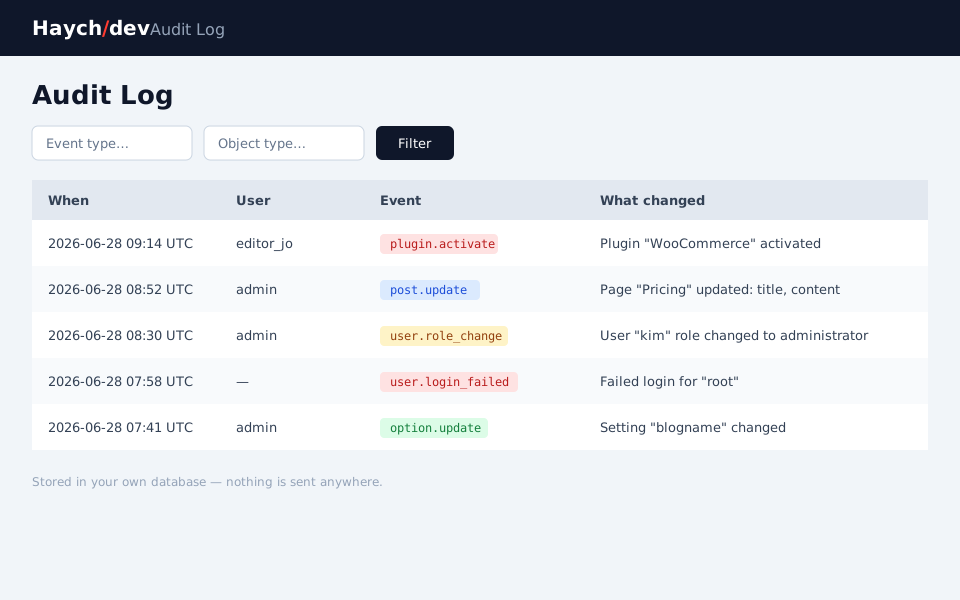
Haychdev Audit is a privacy-first WordPress activity-log plugin that records what changed on your site, who changed it, and when — entirely in your own database, with nothing sent to a third-party service. It logs every standard change: posts and pages, users and roles, plugins and themes, settings, and taxonomy terms — each entry capturing the acting user, a timestamp, the IP address, and a summary of exactly which fields changed. Logins, logouts, and failed logins are recorded for context.
Unlike audit tools that push your activity to a hosted dashboard or gate basic reporting behind a subscription, Haychdev Audit keeps the entire trail in your own database and makes no outbound calls. The free plugin is complete on its own; the optional Pro add-on adds full before/after diffs, alerts, export, and login insights — and lives entirely off WordPress.org.
Compare: A privacy-first WP Activity Log alternative
Why Haychdev Audit
- What changed, and who did it
Every edit to a post, user, plugin, theme, setting, or taxonomy term is recorded with the acting user, a timestamp, the IP address, and a summary of exactly which fields changed — so you can answer "who broke the homepage?" in seconds.
- Your log, your database
The entire trail lives in a single table in your own WordPress database. Nothing is sent to a third-party service, and the free build makes no outbound HTTP requests at all. Delete the plugin and the table goes with it.
- Built for performance
Events are buffered during the request and written in one batch on shutdown, so logging never blocks a page load — even when a single save touches many things.
- Full before/after diffs (Pro)
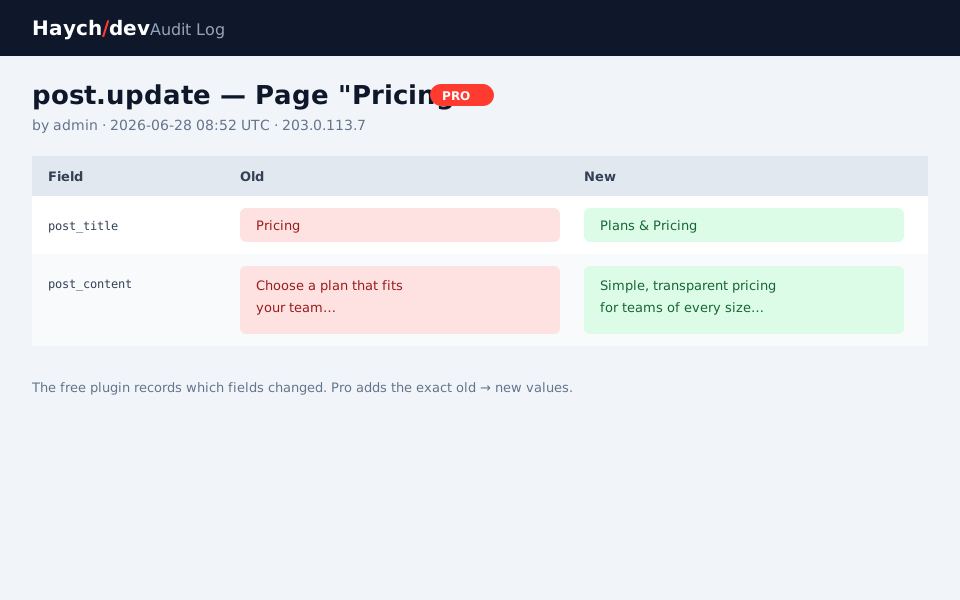
The free plugin tells you which fields changed; the Pro add-on records and displays the exact previous and new values in a side-by-side diff, so you can see precisely what a setting or post was before someone touched it.
- Alerts the moment it matters (Pro)
Watch the events you care about — a plugin activating, a role changing, a settings edit — and get an email plus an optional webhook to Slack, Discord, or Zapier. Failures are non-blocking and never slow the site.
- Privacy-correct by design
The acting IP is filterable (hash or omit it), and a person's entries can be exported or permanently erased from WordPress's own Tools → Export/Erase Personal Data screens.
Screenshots
Free vs Pro
Free
- Logs every standard change: posts, users, plugins/themes, settings, and taxonomy terms
- Records who (the logged-in user), when, the acting IP, and which fields changed
- Logins, logouts, and failed logins captured for context
- Filterable admin viewer — by event type, object type, and user
- 90-day retention by default, pruned automatically (filterable)
- WordPress core privacy tools: export and erase a person's entries
- No account, no license key, no external requests of any kind
Pro
Everything in Free, plus:
- Full before/after diff viewer — the exact old → new values, side by side
- Extended or unlimited retention (raise the 90-day window; keep entries forever)
- Alerts on watched events — email plus a generic JSON webhook (Slack/Discord/Zapier)
- CSV / JSON export of the filtered log
- Read-only login insights — failed-login tally, last-login per user, recent logins
How Haychdev Audit compares
Them: Deep event coverage, but the richer reporting, alerting, and external/SIEM integrations live behind a premium subscription, and the free tier is capped.
Ours: Every event type is logged in the free core. Full diffs, alerts, and export come from a one-time, off-site Pro add-on — and the log never leaves your database.
Them: A popular free logger, but it records that something changed without field-level before/after values, and has limited built-in alerting.
Ours: Free shows which fields changed; Pro adds the exact old → new diff plus email and webhook alerts on the events you choose.
FAQ
- Does it send my data anywhere?
- No. The activity log is stored only in your site's own database. The free build makes no outbound HTTP requests of any kind.
- What exactly gets logged?
- Creating, updating, and deleting posts and pages; user create/update/role-change/delete plus logins, logouts, and failed logins; plugin and theme activate/deactivate/install/update; changes to core settings; and taxonomy term changes. Each entry records the user, time, IP, and which fields changed.
- How long are entries kept?
- 90 days by default, pruned automatically. You can change the window with the hd_audit_retention_days filter, and the Pro add-on lets you set any window — or keep entries forever.
- Will it slow down my site?
- No. Events are buffered and written in a single batch on the shutdown hook, so logging never blocks the response, even when one save changes many things.
- What's the difference between free and Pro?
- The free plugin logs every event and shows which fields changed. Pro adds the exact before/after values in a diff viewer, extended/unlimited retention, email and webhook alerts, CSV/JSON export, and read-only login insights. Pro is a separate add-on hosted on haychdev.com — none of it is bundled into the free WordPress.org build.
- Does it store visitors' IP addresses?
- It records the acting (logged-in) user's IP for accountability. You can hash or omit it with the hd_audit_capture_ip filter, and a person's entries can be exported or erased via WordPress's core privacy tools.
- Is this a self-hosted alternative to WP Activity Log or Simple History?
- Yes. Every event is logged on your own server and stays in your database — no cloud account, no per-site SaaS pricing, and no data leaves your site.