
Haych/dev Forms
Forms that don't phone home. Built with the WordPress block editor, submissions stored in your own database.
Last updated
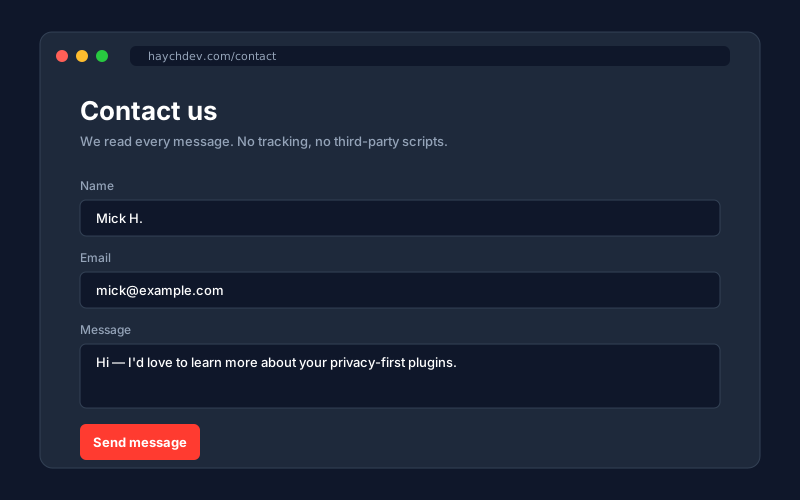
Haychdev Forms is a WordPress form builder that doesn't send your visitors' data anywhere else. Forms are built from native blocks, submissions are saved in your own database, and notification emails go out through WordPress's own mailer. Nothing in the public-facing pipeline calls a third party.
The free plugin ships with file uploads, per-field AES-256-GCM encryption, honeypot and time-trap spam protection, and the ability to mark fields as sensitive so their values stay masked in the admin. The Forms Pro add-on unlocks per-IP rate limiting, auto-delete retention, and bulk status actions.
Why Haych/dev Forms
- Your visitors' data stays on your site
Submissions are saved in your own WordPress database. No SaaS, no remote keys, no third-party APIs. The plugin makes zero outbound HTTP calls.
- Built with blocks, not a builder
You add fields the same way you build any page in WordPress. Text, email, phone, textarea, dropdown, checkbox, and file upload — all free. Edit a form, embed it anywhere.
- File uploads, free
Add a file field, set the MIME types you'll accept, and you're done. Uploads attach to the entry and download from the admin behind a private link — included in the free plugin.
- A proper inbox in your admin
Submissions land in their own admin screen with date, form, status, and a quick preview. Click one to read it. Status flips from new to read on its own.
- Notification emails out of the box
Each form has its own notify-to address. The plugin uses WordPress's own wp_mail, so it picks up any SMTP plugin you already have set up.
- Encryption-ready
Submissions in v1 are stored as plain JSON in your database. A future release will let you turn on per-field encryption for sensitive forms without changing any of the ones you've already built.
Screenshots
Free vs Pro
Free
- Block-based form builder with 8 native field types (text, email, phone, textarea, dropdown, checkbox, file upload, submit)
- File upload field with MIME allow-listing and a max-size limit
- REST submit endpoint with server-side validation
- Per-field AES-256-GCM encryption at rest
- Honeypot + HMAC-signed time-trap spam protection
- Mark fields as sensitive (masked in the admin viewer)
- Admin entry viewer with single and bulk delete
- Email notifications to your WordPress admin address
- Hashed IP and User-Agent metadata, no raw values stored
Pro
Everything in Free, plus:
- Per-IP rate limiting
- Per-form auto-delete after N days
- Metadata keep / raw / drop modes
- Per-form notification address
- Bulk mark-read and mark-spam
How Haych/dev Forms compares
Them: Drag-and-drop builder, but entry storage and most field types require a paid license.
Ours: Built from native blocks, with encrypted entries and an admin inbox in the free core.
Them: Capable, but paid-only from the start and a larger install than most sites need.
Ours: Free core, smaller footprint, and submissions are AES-256 encrypted at rest.
Them: Free and widely used, but it stores no entries — you need a separate add-on for that.
Ours: Submissions are stored and encrypted out of the box, with an admin viewer, no add-ons.
FAQ
- Does it call any third-party APIs?
- No. Submissions go straight to your own database, and notification emails use WordPress's own wp_mail. There's no Captcha vendor, no antispam SaaS, and nothing that phones home in the background.
- How do I add a form to a page?
- Create a new Form from your admin, drag in the fields you want, save it. Then on any page or post, drop in the Form block and pick that form from the dropdown.
- Can I export submissions?
- v1 has an admin screen with per-entry detail and bulk delete. CSV export and webhooks are planned for a later release.
- What happens when I delete a form?
- Everything tied to it is deleted with it: the submissions, the uploaded files, the attachments. No orphaned data left lying around.
- Is it encrypted?
- Yes. The free plugin supports per-field AES-256-GCM encryption at rest. You define an encryption key in wp-config.php, mark individual fields as encrypted in the block editor, and submissions for those fields are stored as ciphertext. The admin entry viewer decrypts on request.
- How big is it?
- The frontend handler is about 4 KB of plain JavaScript and 1 KB of CSS. No React on the public side, no extra bundles for visitors to download.
- How is this different from WPForms or Contact Form 7?
- Submissions are encrypted and stored in your own database with no add-ons required, and the form builder uses native WordPress blocks rather than a proprietary interface.