
Haych/dev Hardener
Harden WordPress in one click. Fingerprint removal, security headers, custom login URL — no external calls.
Last updated
Haychdev Hardener is a server-side WordPress security plugin that removes the breadcrumbs that reveal your site is built on WordPress — version strings, generator tags, emoji scripts, sensitive file paths — and blocks common attack surfaces like author enumeration and XML-RPC. All free, all running through WordPress hooks without touching your theme or .htaccess. The Pro add-on layers on six HTTP security headers and a custom login URL for sites that need the full hardening stack.
Why Haych/dev Hardener
- Invisible to scanners
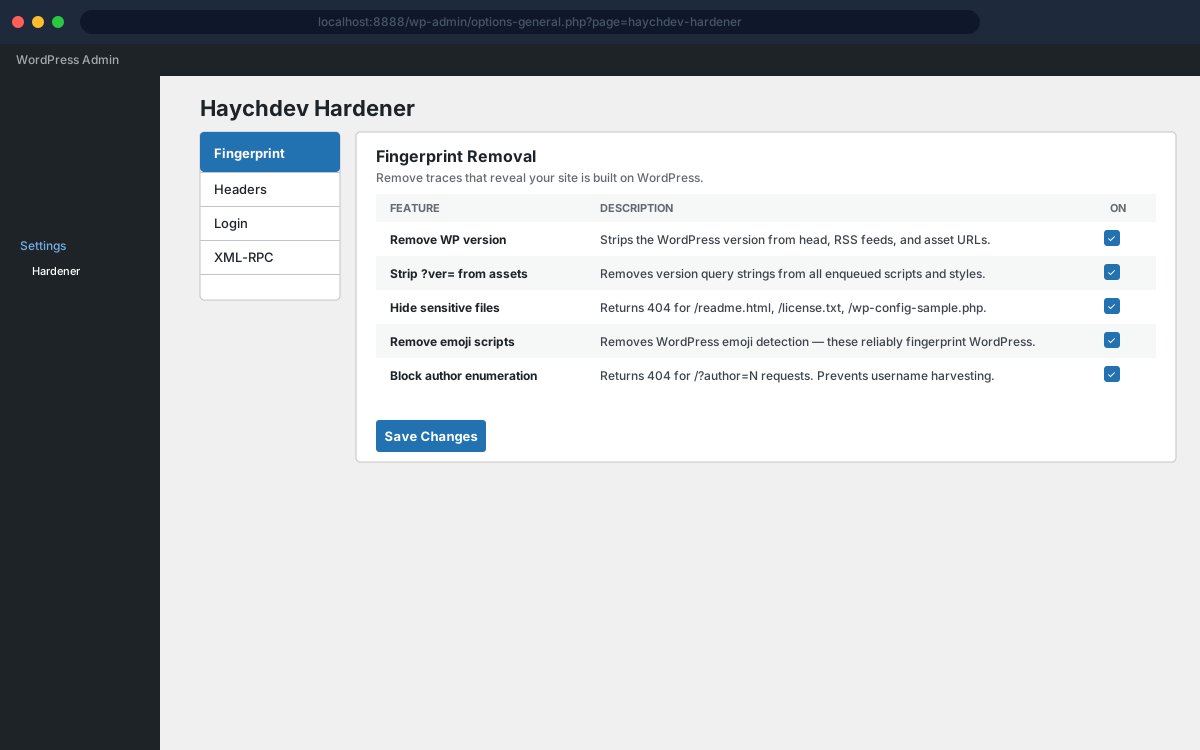
Strips the WordPress version from every output that exposes it — the generator meta tag, RSS feeds, and asset ?ver= query strings. Automated WordPress scanners stop finding you.
- Blocks author enumeration and XML-RPC
Returns 404 for /?author=N requests to prevent username harvesting, and disables xmlrpc.php along with the X-Pingback header. Both are free features in the core plugin.
- HTTP security headers (Pro)
Outputs X-Frame-Options, X-Content-Type-Options, Referrer-Policy, Permissions-Policy, HSTS (HTTPS only), and X-XSS-Protection on every response. Each header is individually togglable. Requires the Pro add-on.
- Custom login URL (Pro)
Move wp-login.php to any secret slug you choose. The original URL returns a 404. Logout and password-reset flows follow the custom URL too — no partial-protection gaps. Requires the Pro add-on.
- Removes WP fingerprints from source
Removes the RSD link, WLW manifest link, and emoji detection scripts from your page source. These three alone are enough for many scanners to confirm a WordPress installation.
- No JS, no external calls
Pure PHP — no JavaScript bundle, no CDN, no license server. Every hardening decision runs locally inside WordPress hooks.
Screenshots
Free vs Pro
Free
- Remove the WordPress version from meta tags, RSS feeds, and asset URLs
- Strip ?ver= query params from all enqueued scripts and styles
- Return 404 for /readme.html, /license.txt, and /wp-config-sample.php
- Remove RSD link, WLW manifest link, and emoji detection scripts
- Block author enumeration (/?author=N returns 404)
- Disable XML-RPC and remove the X-Pingback header
Pro
Everything in Free, plus:
- X-Frame-Options: SAMEORIGIN — prevents clickjacking via iframes
- X-Content-Type-Options: nosniff — stops MIME-type sniffing
- Referrer-Policy: strict-origin-when-cross-origin
- Permissions-Policy — disables camera, microphone, geolocation, payment APIs
- Strict-Transport-Security (HSTS) — forces HTTPS for one year (HTTPS sites only)
- X-XSS-Protection: 1; mode=block — legacy XSS filter for older browsers
- Custom login URL — move wp-login.php to any secret slug (returns 404 at original)
How Haych/dev Hardener compares
Them: Full security suite with a firewall and scanner — both phone home and add measurable overhead.
Ours: Hardening only — no JavaScript, no external calls, no background processes reporting anywhere.
Them: Broad feature set, but most of it requires Pro and connects to their dashboard.
Ours: Fingerprint removal, security headers, and login hardening — free core, all server-side.
Them: Cloud malware scanning billed per site, per year.
Ours: No cloud dependency — the hardening runs directly on your server with no subscription scan.
FAQ
- Will this break my site?
- The default settings are conservative — all features are safe for the vast majority of WordPress sites. The custom login URL is the only feature that requires care; the admin page shows a warning to test in a private window before saving.
- Does it affect page speed?
- No. Fingerprint removal uses WordPress filters that run at hook time, not at render time. Security headers are a single header() call. There is no database query overhead beyond the one wp_options read on init.
- Can I still use Jetpack or the WordPress mobile app?
- Jetpack and the mobile app require XML-RPC. If you need XML-RPC for those tools, leave the XML-RPC disable toggle off in the settings — it is a free, opt-in toggle.
- What happens if I forget my custom login URL?
- Deactivate the plugin via FTP or your host's file manager by renaming the plugin directory — this bypasses the login redirect and restores access to /wp-login.php. Then reactivate and clear the slug.
- Does it add a Content-Security-Policy header?
- Not in v1. CSP is highly site-specific and misconfiguration breaks JavaScript and external resources. It is on the roadmap as an advanced option once a safe default policy is established.
- Is this a lighter alternative to Wordfence?
- For hardening specifically, yes. It removes fingerprints, adds security headers, and can move your login URL — with no JavaScript, no scanner, and no external server calls.