
Haych/dev Term Tree
Replace the flat category list with a file-explorer tree for your post categories — drag-to-reorder and every taxonomy in Pro.
Last updated
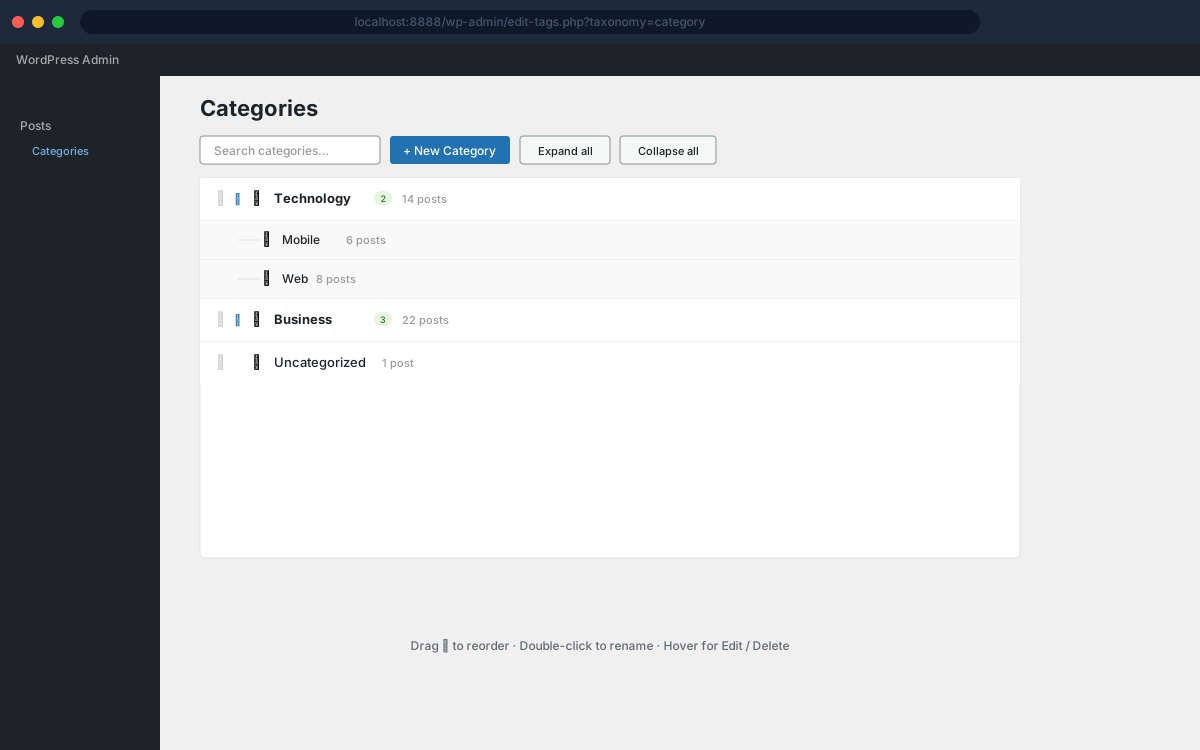
Haychdev Term Tree is a WordPress taxonomy-management plugin that replaces the flat category admin table with a file-explorer tree for your post categories. The free build brings keyboard navigation, search, right-click actions, and persistent expand/collapse state. The Pro add-on adds drag-and-drop reorder with custom order applied to all frontend queries, inline create and rename, and tree view across every hierarchical taxonomy including WooCommerce product categories.
Why Haych/dev Term Tree
- File-explorer tree replaces the flat table
The default WordPress category admin table is replaced with a collapsible file-explorer tree. Folder icons, child-count badges, and post counts at a glance — no more scrolling through hundreds of flat rows.
- Drag-and-drop reorder
Drag any term to change its position within the same level. The new order is saved instantly via AJAX — no page reload. Uses jQuery UI Sortable which ships with WordPress, so there is nothing extra to download.
- Custom order flows to the frontend
The order you set in the admin is automatically applied to wp_get_terms() and all standard WordPress category queries. Menus, widgets, and templates pick it up without any code changes.
- Works with every hierarchical taxonomy (Pro)
The Pro add-on extends the tree view beyond post categories to WooCommerce product categories, custom post type taxonomies, and any taxonomy registered with hierarchical=true and show_in_rest=true.
- Inline create and rename
Click "+ New" to add a term directly in the tree without leaving the screen. Double-click any term name to rename it in-place. Both operations use the WP REST API and update instantly.
- No external calls, no build step
One PHP plugin, one JS file, one CSS file. jQuery UI Sortable already ships with WordPress admin — nothing extra is downloaded. No npm, no CDN, no tracking.
Screenshots
Free vs Pro
Free
- Finder-style tree view in the right column, alongside WP's Add New form
- Live updates — new categories appear without a page refresh
- Persistent expand/collapse state and last-selected row across reloads
- Keyboard navigation (arrows, Enter, Delete, /, Esc, Home/End)
- Right-click context menu (edit, copy slug, copy link, delete)
- Search with match highlighting and auto-expanded ancestors
- Guide lines, folder/leaf icons, hover and selection states
Pro
Everything in Free, plus:
- Drag-and-drop reorder within the tree
- Custom order applied to wp_get_terms and all frontend queries
- Inline create new terms with one click
- Double-click any term to rename in-place
- Tree view across every hierarchical taxonomy, including WooCommerce categories
How Haych/dev Term Tree compares
Them: A flat checklist — hierarchy is invisible once you have more than a handful of terms.
Ours: A collapsible tree with guide lines, search, and keyboard navigation, in the same screen.
Them: Adds drag-to-reorder to the existing flat list, but the list stays flat.
Ours: A full tree view with reorder, inline rename, and custom order applied to frontend queries.
FAQ
- Does it work with WooCommerce product categories?
- WooCommerce product categories and all other hierarchical taxonomies beyond post categories require the Pro add-on. The free build provides the tree view for WordPress post categories only.
- What if I have a custom taxonomy without REST support?
- Custom taxonomy support is a Pro feature. With Pro active, the plugin shows an admin notice for any taxonomy that lacks REST support, explaining how to enable it with show_in_rest=true in the taxonomy registration.
- Will the custom category order appear on the frontend?
- Frontend ordering (via wp_get_terms(), get_categories(), and the nav menu builder) is a Pro feature. The Pro add-on hooks into the terms_clauses filter to apply the saved order to all frontend queries. The free build provides the admin tree view for post categories only.
- Does it affect performance?
- The admin tree renders entirely client-side from an inlined JSON blob — no extra AJAX requests on page load. With Pro active, the terms_clauses filter adds one LEFT JOIN to term queries for hierarchical taxonomies; for sites with fewer than a few thousand terms this is negligible.
- Can I drag a term into a different parent?
- Yes. jQuery UI Sortable's connectWith option allows dragging between sibling lists — so you can move a term from one parent to another by dropping it onto the target parent's child list.
- Is there a better way to manage WordPress categories than the default list?
- Term Tree replaces the flat checklist with a file-explorer tree that has search, keyboard navigation, and — with Pro — drag-to-reorder that carries through to your frontend queries.