Open Hours
Business hours your customers can trust: a live "Open now" badge, a clean hours table, and Google-ready schema — all from one source of truth.
Last updated
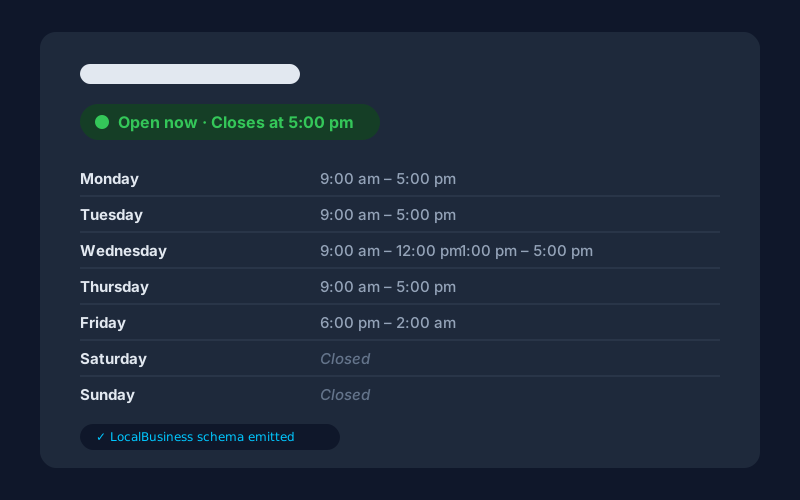
Open Hours is a privacy-first WordPress plugin that keeps your business hours honest everywhere they appear: the hours table on your contact page, the live "Open now / Closes at 5:00 pm" badge, and the LocalBusiness structured data Google reads. You set the hours once; every surface renders from that single source of truth.
The badge is computed in the visitor's browser — about 2KB of dependency-free JavaScript — so full-page caching can never show a stale open/closed state, and daylight saving is handled by your site's own timezone. Real-world schedules are first-class in the free plugin: split shifts, closed days, and hours that run past midnight for bars and late-night takeaways.
The free plugin is complete on its own; the optional Pro add-on adds the special-hours calendar for holidays, multiple locations, a countdown, and an automatic "we're closed" banner — and lives entirely off WordPress.org.
Why Open Hours
- One source of truth for your hours
Set your hours once and everything stays in sync — the table your visitors read, the "Open now" badge, and the structured data Google reads. No more editing a text widget in three places and forgetting one.
- A badge that never lies to a cached page
Most "open now" plugins render the status on the server, so a page cached at 10 am still says "Open" at midnight. Open Hours computes the badge in the visitor's browser from your hours and your site's timezone — about 2KB of dependency-free JavaScript, correct on any cache, DST included.
- Google reads the same hours your customers do
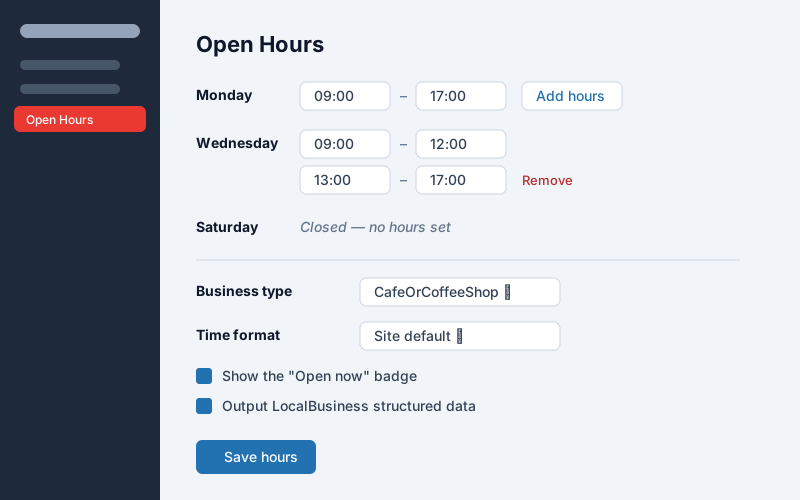
The plugin emits LocalBusiness JSON-LD with openingHoursSpecification generated from the exact hours on the page. Pick your business type from a curated list, or switch the schema off if your SEO plugin already outputs it.
- Real-world hours, not just 9-to-5
Split shifts for the lunch break, closed days, and hours that run past midnight for bars and takeaways — all first-class, in the free plugin, in the display and in the schema.
- Holidays handled everywhere at once (Pro)
Mark December 25th closed once in the special-hours calendar and the table, the badge, the countdown, and the schema all update together. No more customers standing outside a dark shop because your website said you were open.
- Every location, its own hours (Pro)
Run more than one branch? Pro renders each location with its own hours, badge, and schema — and your theme can style each block independently.
Screenshots
Free vs Pro
Free
- Weekly hours with split shifts (9–12 / 1–5) and past-midnight hours (18:00–02:00)
- Live "Open now / Closes at 5:00 pm" badge that stays correct on cached pages
- Hours table via a Gutenberg block or the [open_hours] shortcode
- LocalBusiness structured data (openingHoursSpecification) from the same hours you display
- Curated business types — Restaurant, Store, MedicalBusiness, HairSalon, and more
- 12-hour, 24-hour, or site-default time formats
- No account, no license key, no external requests of any kind
Pro
Everything in Free, plus:
- Special-hours calendar — holidays, one-off closures, and half days that override the weekly schedule everywhere at once
- Multiple locations, each with its own hours, badge, and schema
- Countdown — "opens in 40 minutes" / "closes in 1 hour"
- Site-wide "we're closed" banner that appears automatically outside business hours
How Open Hours compares
Them: Outputs opening-hours schema for Google as part of a $79/yr SEO suite — but nothing your visitors can see: no hours table, no open-now badge.
Ours: Schema and the visible display come from the same source, free. The Pro add-on ($29.99/yr) adds the holiday calendar and multi-location, not the basics.
Them: A simple open/closed widget, but the status is rendered server-side — page caching shows stale open/closed states — and there's no structured data for search.
Ours: The badge computes client-side so caching can't make it lie, and LocalBusiness schema ships free — generated from the exact hours on the page.
FAQ
- Does it send my data anywhere?
- No. Your hours live in a single option in your own database. The free build makes no outbound HTTP requests of any kind — no fonts, no APIs, no phoning home.
- Will the "Open now" badge be wrong on cached pages?
- No — that's the core design decision. The hours table and schema are rendered on the server, but the open/closed state is computed in the visitor's browser from your hours and your site's timezone, so full-page caching never shows a stale badge.
- Can I set hours past midnight?
- Yes. A closing time earlier than the opening time (say 18:00–02:00) is treated as running past midnight — in the display, in the badge, and in the schema.
- What if my SEO plugin already outputs LocalBusiness schema?
- Turn ours off with one toggle in the settings. Everything else keeps working — you just avoid duplicate structured data.
- Does the badge need JavaScript?
- Yes — about 2KB of dependency-free JavaScript, loaded only on pages that show your hours. Without JavaScript the badge simply doesn't render; the hours table is always visible.
- What's the difference between free and Pro?
- Free is complete for a single location with a regular weekly schedule — hours, split shifts, past-midnight, badge, block, shortcode, and schema. Pro adds the special-hours calendar (holidays and one-off closures), multiple locations, the countdown, and the automatic closed banner. Pro is a separate add-on hosted on haychdev.com — none of it is bundled into the free WordPress.org build.
- Which timezone does it use?
- Your site's timezone, always — including daylight-saving changes. There's nothing separate to configure or forget.